Hand the routine work to AI, with a key you control.
Give your own assistant or agents a key, and they add new stock, record counts, mark parcels as sent and read your takings, within the role the key holds. AI built into Talstok and AI built for your business are coming.
- You ask
Add this week’s new stock, and publish it.
- Your assistant or agent
An assistant you give the key to, or an agent of your own
- Your key
Manager, packer or viewer: it does only what its role allows
- Your records
Products, stock, orders and customers, in your shop
Three ways to put AI to work
Your own assistant or agents connect today. The other two ways are coming.
- Live today
Your own assistant or agents
Connect them with a key you control, and they work on your products, stock, orders and customers.
How it works AI built into Talstok Coming
AI that comes with the system on a monthly allowance, for a business that would rather not bring its own.
What it coversAI built for your business Coming
An AI system designed around the way your business works, and built for it alone.
Tell us what you need
Connect your own AI
Your assistant or agent gets a key to your shop, and works on your products, stock, orders and customers within the role you give the key. Even a viewer key, which only reads, sees sales like these: what sold, for how much, and how each was paid.
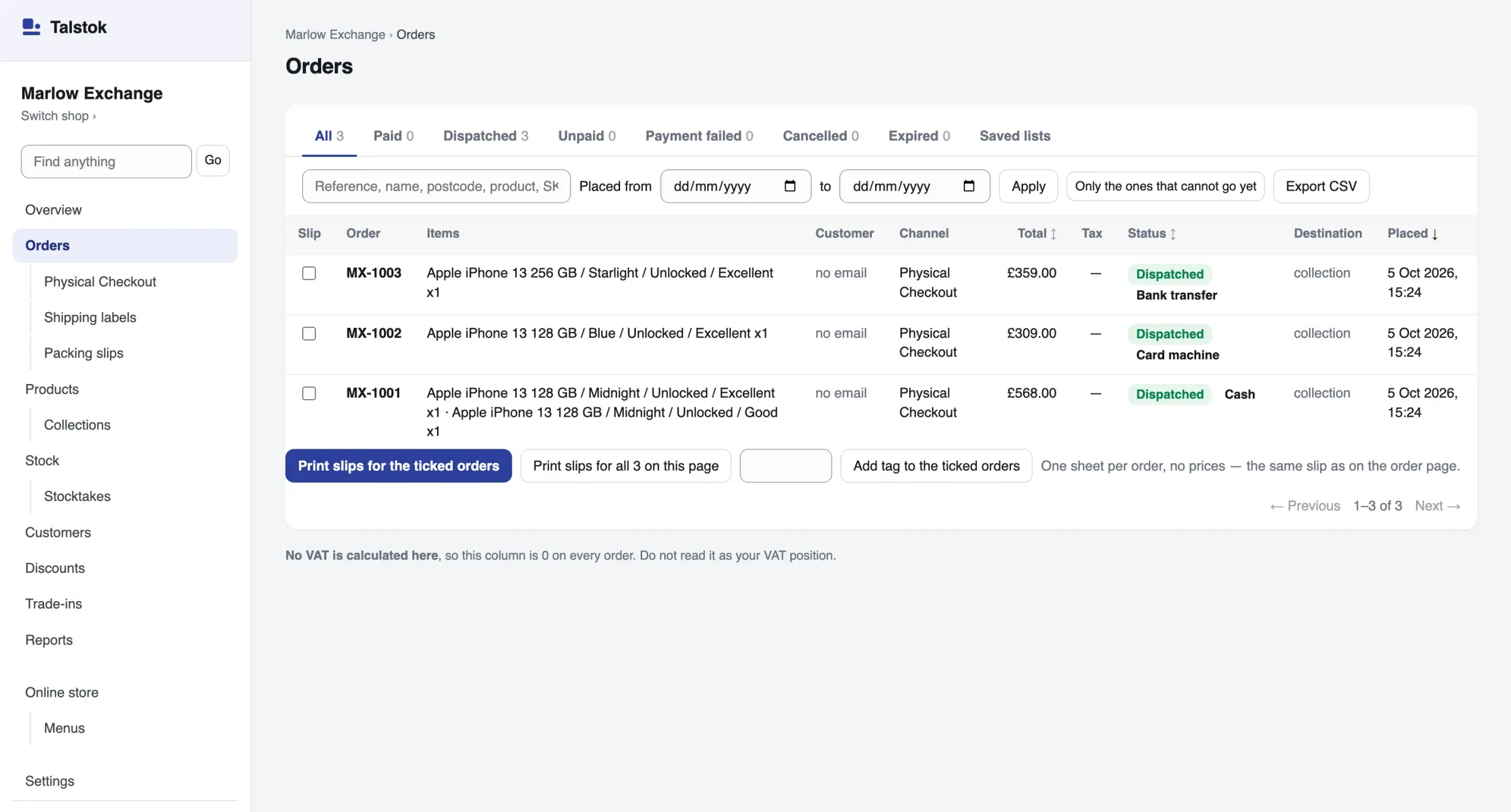
- MX-1001Cash£568.00
- MX-1002Card machine£309.00
- MX-1003Bank transfer£359.00
What you can ask it
Requests for the bases that are live today, in your own words. Each is something your assistant can do now, within its key’s role.
What did we take last week, and which products sold best?Reads the takings and best sellers for any days you name. A viewer key is enough.Stock keeping
Here is this morning’s count. Record it.Records each count as a stocktake. A packer key is enough.Online shop
Add these twelve products with their sizes, prices and opening counts, and publish them.Makes each product whole in one step, then publishes it. Needs a manager key.Online shop: orders
Mark today’s Royal Mail parcels as sent, with their tracking numbers.Dispatches each paid order with its tracking. A packer key is enough.Buying in
Load the new buy prices from the spreadsheet I sent.Sets them in one batch. If any price is far out of line, nothing is saved until you confirm it. Needs a manager key.Services
Add a full service to the price list, with a price for each model we work on.Adds the job and its prices, each waiting for someone at the shop to confirm it. Needs a manager key.
How to connect
For an assistant that takes a key. No programming: you copy one block of settings into it.
Make a key
In Settings, under Apps and API keys, the owner makes a key and gives it a role: manager, packer or viewer. It is shown once.
Add it to your assistant
Copy the settings block below into your assistant’s settings, with your key where it says your API key.
Try a change first
Ask for a trial run of any change. It checks the key’s role, the record and the publish checklist, and saves nothing. A change that passes can still be refused when it is made.
Let it work
It reads and changes your records within the key’s role, until you revoke the key.
Show the settings block
Treat the key like a password: never share the file that holds it, and give each assistant the lowest role that does its job.
On a test shop, use the test address instead, https://api-test.talstok.com, with that shop’s key. No money moves there, and customer log-in cannot be switched on.
Which assistants connect
Any assistant or agent that lets you paste in the settings block, with your key.
Claude Code
Paste the settings block above into a file named
.mcp.json, in the folder you open Claude Code in. It can then use every tool your key’s role allows.Your own agents and tools
An agent or script your developer builds connects to the same address with the same key, or calls the API itself.
An assistant that can only sign in with an account, and has no place for a key, cannot connect today.
The owner stays in charge
What no key can do, and what the owner can see.
Only the owner makes keys
Each key is made in Settings by the shop’s owner. No key can act as the owner.
Orders and products are kept
No key can delete an order, and products are archived rather than deleted.
See when it was last used
The keys screen shows when each key was last used, to the hour.
Build on the same API and MCP server
The tools your assistant uses are the API’s own operations, more than 130 of them, offered over MCP (the Model Context Protocol). A developer can build agents, a website or tools of your own on the same records.
AI built into Talstok Coming
A module with a monthly allowance, for a business that wants AI without bringing its own assistant.
- Reports and analysis of your sales and stock Coming
- Your accounts pulled together in one place Coming
- Your website and catalogue built from your products Coming
- Market research for your kind of business Coming
AI built for your business Coming
An AI system designed around the way your business works, and built for it alone. Write to us about the work you would like it to take on.
Questions about AI
What does it mean to connect my own AI?
It means giving an AI assistant or agent a key to your Talstok shop. With it, the assistant reads and changes your products, stock, orders and customers through Talstok’s MCP server, within the role you give the key. The owner makes the key in Settings and can revoke it at any time.
Do I need AI to use Talstok?
No. Every base works without it, and no assistant can reach your records until the owner makes it a key.
Which assistants can I connect?
Claude Code, and other assistants, agents and developer tools that send your key in a request header. An assistant that can only sign in with an account, and has no place for a key, cannot connect today.
Do I need to know how to code?
No programming is needed: you make a key and copy one block of settings into your assistant. The assistants that take a key today are made for people at ease with developer tools. For a business that would rather not, AI built into Talstok is coming.
Can an assistant change my records?
Yes, within the role of its key. A manager key can change products, prices, stock, orders and settings. A packer key dispatches orders, records stock counts and handles batches and packing slips. It can read prices but not change them, and it cannot read your customer list or see the takings. A viewer key only reads.
Any change can be tried first without saving it, and no key can delete an order.
What does my assistant see?
What its key’s role allows, in the one shop the key belongs to. Every key, a viewer key included, reads your orders: each buyer’s name, email, delivery address and phone number, and the last four digits of their card. Only a manager key reads your customer list or downloads the order and customer spreadsheets. A key never reaches another shop.
What does it cost?
Talstok costs from £20 a month for each shop that takes real money, depending on the parts it uses. Test shops are free. The assistant itself is paid for separately, to whoever provides it.
Does Talstok send my records to an AI company?
No. Talstok itself uses no AI service. An assistant you connect reads what its key allows, and what it does with that is between you and the assistant’s provider.
What is an MCP server?
MCP, the Model Context Protocol, is an open standard for giving an AI assistant tools to use in another system. Talstok’s MCP server, at https://api.talstok.com/mcp, has more than 130 tools: one for each thing the API does, and three that each do a whole job in one call.
How do I stop an assistant?
Revoke its key in Settings, under Apps and API keys. It stops working from its very next request.
Always optional. Start with a test shop.
Every base works in full without AI. Switch nothing on and nothing changes. Test shops are free.