EPOS for farm shops, delis and bakeries
Sell at the counter and online, and keep each batch with its own date, so you know what to sell first and what to recall.
What a food shop switches on
Batches and dates are switched on for the products that need them, and left off for the rest.
Batches and dates
Each batch with its code, where it came from, its best-before date, and a certificate if it has one.
The Expiry dates screen
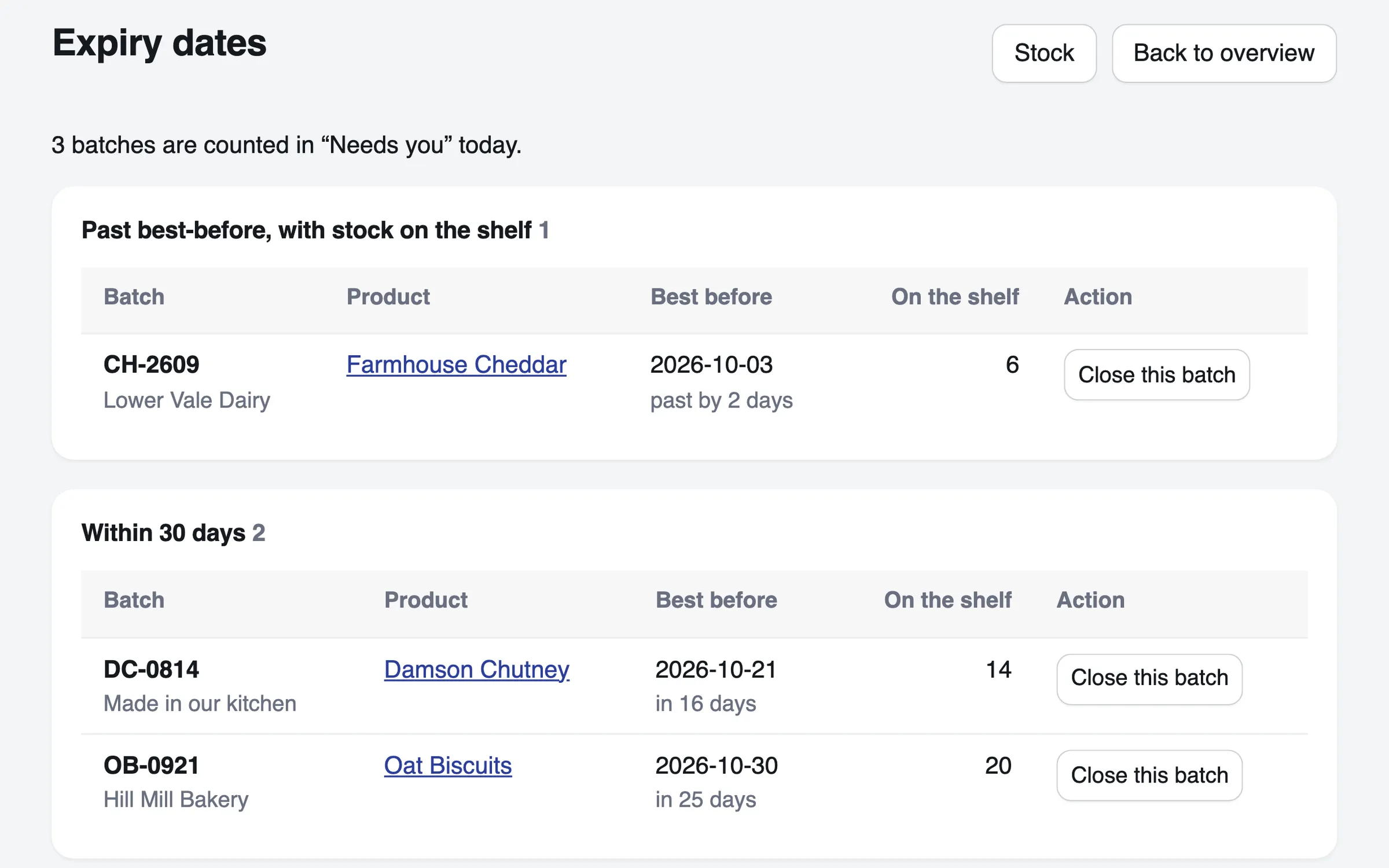
Every open batch, earliest date first, with what is past its best-before and what is due within 30 days.
The recall page
Every parcel a batch went into, with a contact list and a letter for each customer.
Unit prices
A price per 100 g shown beside the price on your online shop, where it applies.
Delivery by weight
Delivery rates by parcel weight, free delivery over an amount, or click and collect.
Hampers and boxes
A bundle made of other products, with its count worked out from the parts it holds. Bundles sell online. At the till, sell the things in it one by one.
From delivery to recall
What happens to one batch of chutney, in order.
Take it in
Record the batch as it arrives: its code, where it came from and its date.
Watch the dates
The Expiry dates screen puts the earliest date first, and flags a batch before its date passes.
Pack by date
When you pack an online order, its batches are listed earliest best-before first. A batch saved without a date is listed above them, so give every batch its date.
Recall if you must
Type the batch code to list every parcel it went into, and who to contact.
Coming for food businesses
Planned, and not built yet.
- Coming
Delivery and telephone orders
Manage the orders you take online or by phone, and the deliveries that go with them, in one place.
For takeaways and anyone who delivers
Not built yet
- Weighing at the till, and pricing by weight at the counter.
- Use-by dates. Each batch keeps one date, as a best-before. A batch past it is flagged, and can still be sent.
- Selling a product that needs a batch number at the till. A counter sale does not record its batch, so the recall page lists parcels sent, not counter sales.
- Selling a hamper or other bundle at the till.
- Table service and kitchen orders for a café.
- Printed receipts, and connecting to a card reader.
Questions
Can I sell cheese or meat by weight?
Not yet, at the till or online. You can sell fixed sizes, such as a 250 g pack. Give the pack its weight, and your online shop shows the price per 100 g beside the price.
How do I recall a batch?
Type the batch code off the label. The recall page lists every parcel that batch went into, with the order, where it went and how to reach the customer, a contact list to download, and a letter for each customer.
Can a bakery or deli use the till?
Yes, for fixed-price items. The till cannot yet sell a bundle, such as a hamper, or a product that needs a batch number. Both sell online. A counter sale does not record which batch it came from.
Can it run a coffee shop?
It can run the counter of a coffee shop that sells beans, kit and cakes to take away. Table service and kitchen orders are not built.
See it with your own products
A test shop is free. Nothing in it is real: no money moves, and it never emails a customer. You pay only once a shop takes real money.